From Prompts to Production Code
Introduction
Series: My Journey to Building AI Agents
Audience: Senior Full Stack Developers · Solution Architects · Tech Leads
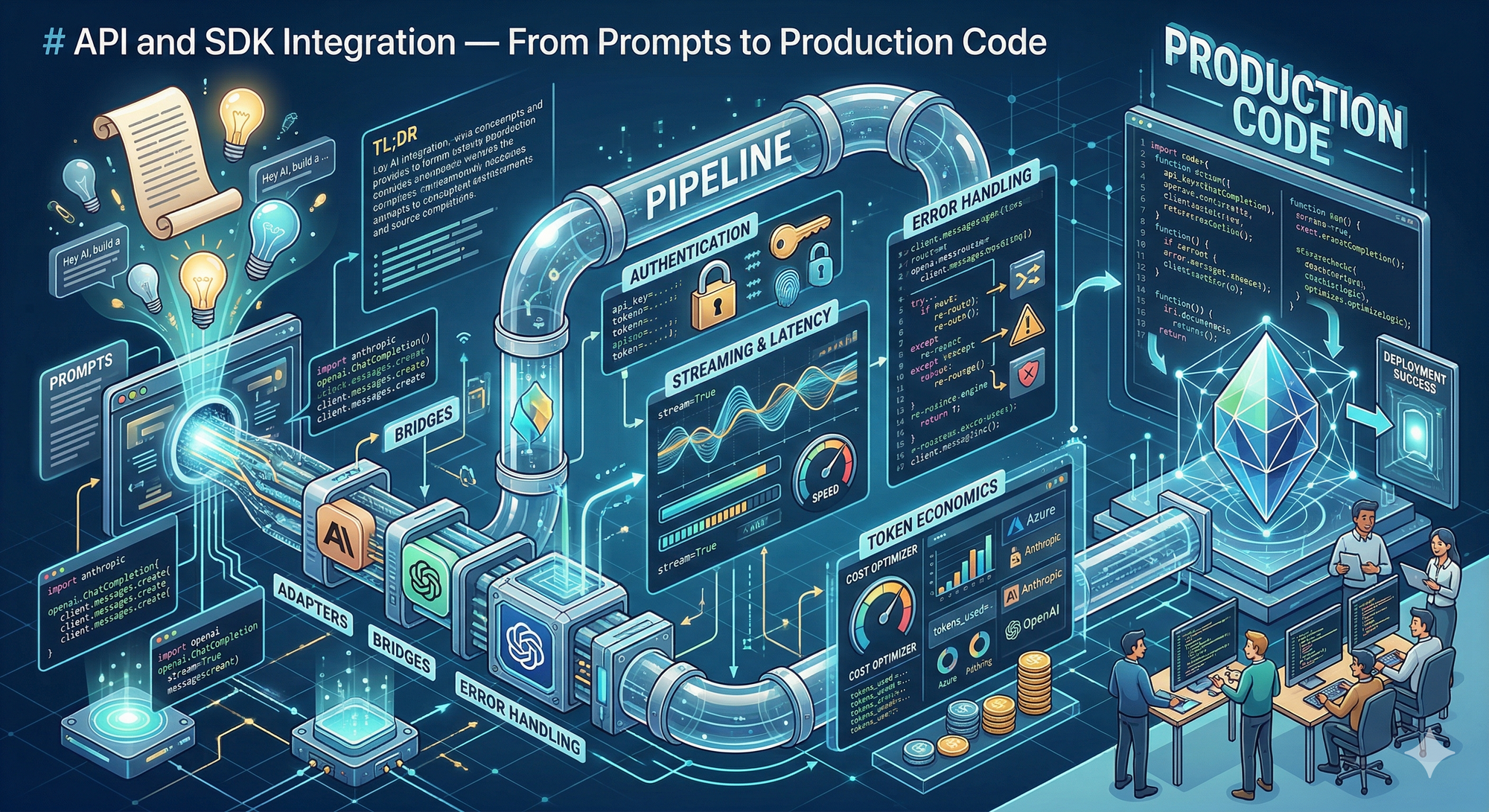
Here's the shift that hit me after the last article: knowing how to write a great prompt is useless if I can't reliably send it to a model and get a response back. Prompt engineering is the creative side — API integration is the plumbing that makes it work.
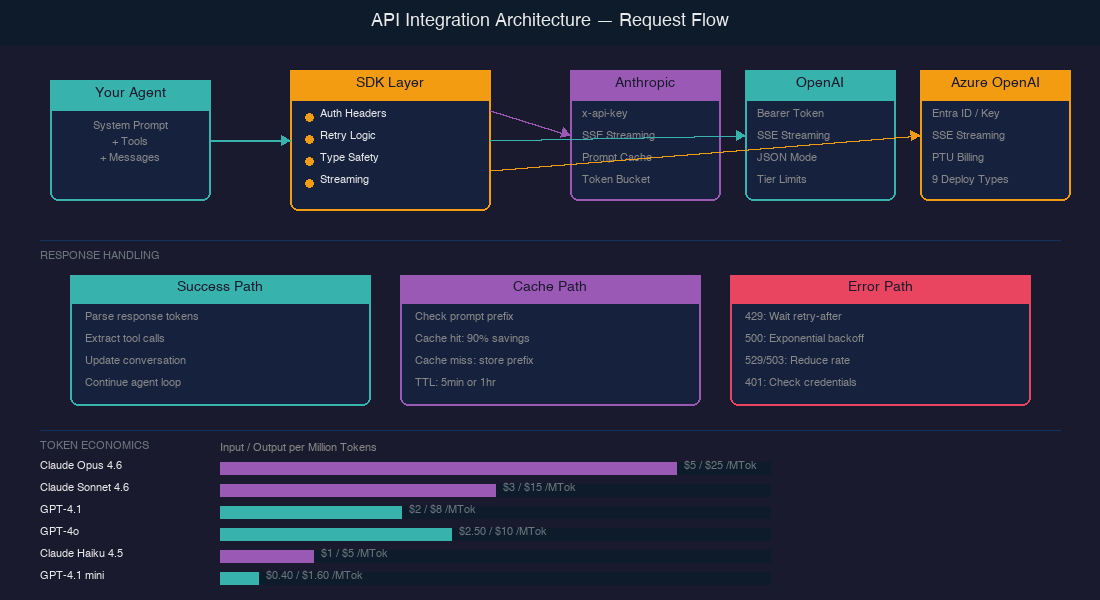
And the plumbing is more interesting than I expected. Each provider handles authentication differently, rate limits differently, even billing differently. Azure wraps OpenAI's models in enterprise governance. Anthropic offers prompt caching that can slash costs by 90%. The SDKs themselves come with built-in retry logic, streaming support, and type safety. Understanding these details isn't optional for building agents — an agent that hits rate limits or bleeds money on uncached tokens won't survive past a prototype.
In this article, I'm working through the practical side: connecting to Claude, OpenAI, and Azure OpenAI in code, handling the things that go wrong, and understanding what each API call actually costs. Let's figure this out together.
Getting Connected: Authentication Across Providers
The first thing I noticed: every provider does authentication slightly differently. Here's what I found:
AUTHENTICATION COMPARISON
════════════════════════════════════════════════════════════════

  ANTHROPIC                    OPENAI                     AZURE OPENAI
  ┌──────────────────┐         ┌──────────────────┐       ┌──────────────────┐
  │ Header:          │         │ Header:          │       │ Option A:        │
  │  x-api-key       │         │  Authorization:  │       │  api-key header  │
  │                  │         │  Bearer <key>    │       │                  │
  │ Also required:   │         │                  │       │ Option B:        │
  │  anthropic-      │         │                  │       │  Microsoft Entra │
  │  version header  │         │                  │       │  ID (Azure AD)   │
  └──────────────────┘         └──────────────────┘       │  via managed     │
                                                          │  identity        │
                                                          └──────────────────┘
- Anthropic uses a custom ['x-api-key' header] along with a required 'anthropic-version' header.
- OpenAI uses the standard ['Authorization: Bearer' pattern].
- Azure OpenAI gives two options — an API key or [Microsoft Entra ID], which Microsoft now recommends because there's ["no key (or connection string) to store."]
But here's the thing that surprised me — the SDKs abstract all of this away. In practice, initialization looks almost identical:
Python
# Anthropic — reads ANTHROPIC_API_KEY from environment
from anthropic import Anthropic
client = Anthropic()

# OpenAI — reads OPENAI_API_KEY from environment
from openai import OpenAI
client = OpenAI()

# Azure OpenAI — managed identity (no API key needed)
from azure.identity import DefaultAzureCredential, get_bearer_token_provider
from openai import AzureOpenAI

token_provider = get_bearer_token_provider(
    DefaultAzureCredential(), "https://ai.azure.com/.default"
)
client = AzureOpenAI(
    base_url="https://YOUR-RESOURCE.openai.azure.com/openai/v1/",
    api_key=token_provider
)
Both Anthropic and OpenAI now offer SDKs in [7] and [5] languages respectively. The SDKs include ["automatic header management, type-safe request and response handling, built-in retry logic and error handling, streaming support"] — so rolling raw HTTP requests is rarely necessary.
Streaming: Why Agents Need It
Streaming was one of those things I initially thought was just a UX nicety — showing text as it generates. But for agents, it's more fundamental than that.
Both Anthropic and OpenAI use [server-sent events (SSE)] for streaming. Anthropic specifically [recommends streaming for long-running requests], especially those over 10 minutes — because without streaming, you risk dropped connections and timeouts.
Here's the tradeoff matrix I've built from the docs:
| Aspect | Streaming | Non-Streaming |
|---|---|---|
| Time to first token | Immediate chunks | Wait for full response |
| Connection stability | Better for long requests | Risk of timeout |
| Content moderation | Harder — "partial completions may be more difficult to evaluate" | Full response available |
| Implementation | More complex (event handling) | Simpler |
| Agent loops | Enables early termination | Must wait for completion |
For agents running multi-step loops, streaming has a practical benefit I hadn't considered: you can detect early if the model is going off-track and cancel the request before wasting tokens on a full response. That matters when you're paying per token.
Python
# Anthropic streaming
with client.messages.stream(
    model="claude-sonnet-4-6",
    max_tokens=1024,
    messages=[{"role": "user", "content": "Analyze this codebase..."}]
) as stream:
    for text in stream.text_stream:
        print(text, end="", flush=True)

# Get the final assembled message
response = stream.get_final_message()
When Things Go Wrong: Error Handling and Rate Limits
Anthropic's rate limiting uses a [token bucket algorithm] — your capacity ["is continuously replenished up to your maximum limit, rather than being reset at fixed intervals."] This is more forgiving than fixed-window rate limiting because bursts are allowed as long as you have bucket capacity.
Here's a comparison of the error codes I need to handle:
ERROR HANDLING DECISION TREE
════════════════════════════════════════════════════════════════

  API Response
      │
      ├── 200 OK ──────────────── Process response
      │
      ├── 401 Auth Error ──────── Check API key ──── Don't retry
      │
      ├── 429 Rate Limited ────── Read retry-after header
      │                           Wait exact seconds
      │                           Retry (earlier retries will fail)
      │
      ├── 500 Server Error ────── Exponential backoff
      │                           1s → 2s → 4s → 8s → give up
      │
      └── 529 Overloaded ─────── Anthropic-specific
           (503 for OpenAI)       Back off, reduce request rate
                                  "Maintain consistent rate for
                                   at least 15 minutes" — OpenAI
A key detail for agents: on [429 errors, Anthropic returns a 'retry-after' header] with the exact seconds to wait. Retrying before that time ["will fail."] OpenAI's guidance for 503 errors is more cautious: ["reduce your request rate to its original level, maintain a consistent rate for at least 15 minutes, and then gradually increase it."]
The good news: both SDKs handle retries automatically. But for agents making many calls, understanding the underlying behavior helps me design better backoff strategies and avoid cascading failures.
Token Economics: The Cost of Intelligence
This is the section I've been most curious about. When an agent runs a multi-step task — say, 10 tool calls with context passed each time — costs multiply fast. Understanding token economics isn't just a billing concern; it shapes architecture decisions.
The rule of thumb: ["1 token is approximately 4 characters or 0.75 words in English."] Both providers offer token counting tools — Anthropic has a [Token Counting API]('POST /v1/messages/count_tokens'), and OpenAI provides [tiktoken], a local BPE tokenizer.
Here's the cost landscape as of April 2026:
| Model | Provider | Input / MTok | Cached Input / MTok | Output / MTok |
|---|---|---|---|---|
| Claude Opus 4.6 | Anthropic | $5.00 | $0.50 | $25.00 |
| Claude Sonnet 4.6 | Anthropic | $3.00 | $0.30 | $15.00 |
| Claude Haiku 4.5 | Anthropic | $1.00 | $0.10 | $5.00 |
| GPT-4.1 | OpenAI | $2.00 | $0.50 | $8.00 |
| GPT-4o | OpenAI | $2.50 | $1.25 | $10.00 |
| GPT-4.1 mini | OpenAI | $0.40 | $0.10 | $1.60 |
Look at that "Cached Input" column. Anthropic's [prompt caching] drops input costs to 10% of the base price on cache hits. For agents that re-send the same system prompt and tool definitions every turn, this is transformative. Cache writes cost 1.25× the base price, but reads cost just 0.1×. Run the numbers and caching pays for itself after a single read — every subsequent hit is nearly free.
And here's the kicker for rate limits: ["cached input tokens do not count towards rate limits."] So caching isn't just cheaper — it's faster too.
Both providers also offer batch APIs with 50% discounts on input and output tokens, though batch processing has a 24-hour turnaround — useful for evaluation runs, not real-time agents.
Azure OpenAI: Enterprise Economics
Azure adds another dimension. Beyond standard pay-per-token pricing, Azure offers [Provisioned Throughput Units (PTUs)] — you ["purchase a fixed number of provisioned throughput units that guarantee a specific level of processing capacity."] It's billed hourly instead of per-token, which makes costs predictable for high-throughput production workloads.
Azure also provides [9 deployment types] ranging from Global Standard (highest quota, any region) to Data Zone deployments for compliance — the kind of enterprise governance that matters when agents are handling sensitive data.
What I've Learned So Far
After wiring up these APIs and digging into the economics, here's what crystallized:
- SDKs handle the hard parts. Authentication, retries, streaming, type safety — all built in. Rolling raw HTTP is rarely justified. Pick the official SDK and let it manage the plumbing.
- Streaming is essential for agents, not optional. Beyond UX, it prevents timeouts on long requests and enables early termination of off-track responses. For agentic loops, this is architectural, not cosmetic.
- Prompt caching changes agent economics. A 90% cost reduction on repeated input tokens means the system prompt + tool definitions that get re-sent every turn become nearly free after the first call. Design agent loops with caching in mind.
- Error handling is the main path. Agents making many API calls will routinely hit rate limits and server errors. Understanding token bucket algorithms,
retry-afterheaders, and exponential backoff isn't defensive coding — it's core agent infrastructure. - Provider choice is an architecture decision. Anthropic offers the deepest caching. OpenAI has the widest model range. Azure adds enterprise governance with PTUs and managed identity. The right choice depends on the agent's deployment context.
What's Next
In the next article, I'm diving into Tool Use and Function Calling — the mechanism that turns an LLM from a text generator into an agent that can actually do things. I want to understand how models decide which tool to call, how to design good tool schemas, and what makes the difference between a tool-using chatbot and a reliable agent. I'm genuinely curious about where the boundary is between giving a model too few tools and overwhelming it with too many.
*This is Article 4 of 12 in my AI Agents learning journey.*
See you there.
Resources I'm Using
- Getting Started — Anthropic API
- Client SDKs — Anthropic
- Rate Limits — Anthropic
- Streaming — Anthropic
- Error Handling — Anthropic
- Prompt Caching — Anthropic
- Model Pricing — Anthropic
- Quickstart — OpenAI
- Streaming Responses — OpenAI
- Error Codes — OpenAI
- Token Counting — OpenAI
- tiktoken — OpenAI
- Azure OpenAI Overview
- Managed Identity — Azure OpenAI
- Deployment Types — Azure AI Foundry