
Introduction & Series Overview
Series: Unified DLQ Handler series
Audience: Senior Full Stack Developers · Solution Architects · Tech Leads
Every Azure Service Bus queue and topic subscription comes with a built-in Dead Letter Queue. Messages land there when processing fails, exceeded delivery attempts, expired TTL, malformed payloads. The standard approach? Each application domain handles its own DLQ processing independently.
For Solution Architects managing enterprise messaging infrastructure, this pattern creates operational overhead. Multiple teams write similar DLQ handling logic. Monitoring fragments across services. Classification rules vary by implementation. When failures spike, diagnosing root causes requires investigating each application individually.
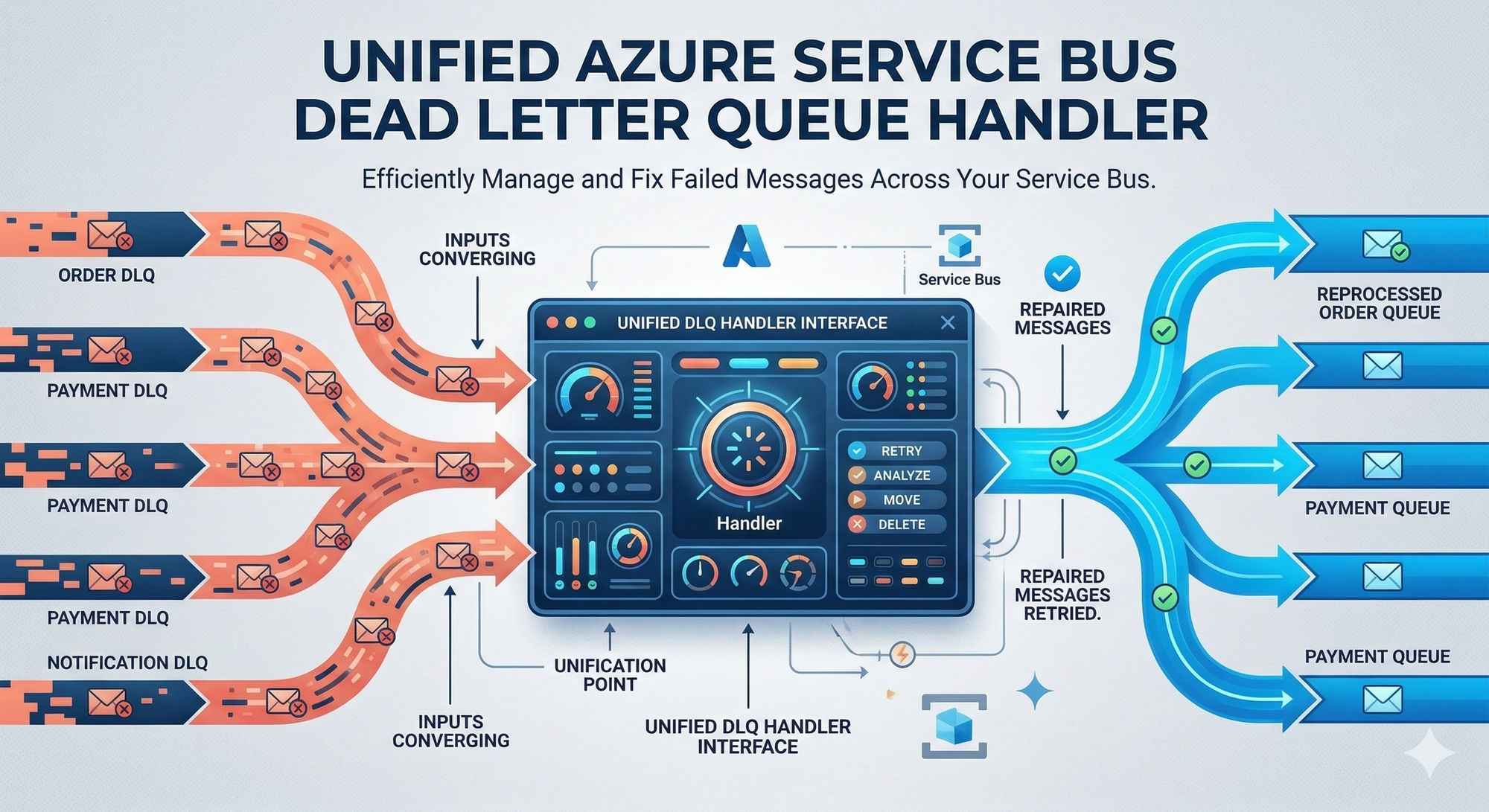
This article introduces a unified architecture that consolidates DLQ processing into a single, centralized service. You'll understand why centralization matters, how the architecture works at a high level, and what technology choices drive the design.
The Problem with Distributed DLQ Handling
Organizations running Azure Service Bus at scale face a common pattern: each microservice or domain team builds its own DLQ processing logic.
| Aspect | Distributed Approach | Unified Approach |
|---|---|---|
| Code Duplication | Each service implements similar logic | Single implementation serves all entities |
| Monitoring | Fragmented across applications | Centralized dashboards and alerts |
| Classification Rules | Inconsistent across teams | Standardized transient/non-transient definitions |
| Operational Visibility | Requires checking multiple services | Single pane of glass |
| New Entity Onboarding | Requires code changes per service | Automatic discovery |
Distributed DLQ handling works when you have two or three queues. At enterprise scale, dozens of queues, hundreds of topic subscriptions, the maintenance burden compounds. Each new entity requires explicit configuration. Each team interprets failure classifications differently.
What is a Dead Letter Queue?
"Azure Service Bus queues and topic subscriptions provide a secondary subqueue, called a dead-letter queue (DLQ). The dead-letter queue doesn't need to be explicitly created and can't be deleted or managed independent of the main entity."
The DLQ holds messages that cannot be delivered or processed. Understanding why messages reach the DLQ is essential for classification.
DLQ Path Formats
You access the dead-letter queue using these path patterns:
| Entity Type | DLQ Path Pattern |
|---|---|
| Queue |
<queue path>/$deadletterqueue
|
| Topic Subscription |
<topic path>/Subscriptions/<subscription path>/$deadletterqueue
|
Why Messages Become Dead-Lettered
The following system-defined reasons cause automatic dead-lettering:
| Dead-Letter Reason | Dead-Letter Error Description |
|---|---|
HeaderSizeExceeded
|
"The size quota for this stream exceeded the limit." |
TTLExpiredException
|
"The message expired and was dead lettered." |
Session ID is null
|
"Session enabled entity doesn't allow a message whose session identifier is null." |
MaxTransferHopCountExceeded
|
"The maximum number of allowed hops when forwarding between queues exceeded the limit. This value is set to 4." |
MaxDeliveryCountExceeded
|
"Message couldn't be consumed after maximum delivery attempts." |
MaxDeliveryCountExceeded Details
"There's a limit on number of attempts to deliver messages for Service Bus queues and subscriptions. The default value is 10. Whenever a message is delivered under a peek-lock, but is either explicitly abandoned or the lock is expired, the delivery count on the message is incremented. When the delivery count exceeds the limit, the message is moved to the DLQ."
TTLExpiredException Details
"When you enable dead-lettering on queues or subscriptions, all expiring messages are moved to the DLQ. The dead-letter reason code is set to: TTLExpiredException. Deferred messages won't be purged and moved to the dead-letter queue after they expire. This behavior is by design."
Critical DLQ Characteristics
No Automatic Cleanup
"There's no automatic cleanup of the DLQ. Messages remain in the DLQ until you explicitly retrieve them from the DLQ and complete the dead-letter message."
QuotaExceededException Risk
Unmanaged DLQ buildup leads to quota issues. From the messaging exceptions documentation:
"The messaging entity has reached its maximum allowable size, or the maximum number of connections to a namespace has been exceeded."
Unified Handler Architecture Overview
The centralized DLQ handler follows an eight-step processing pipeline that runs on a configurable schedule.
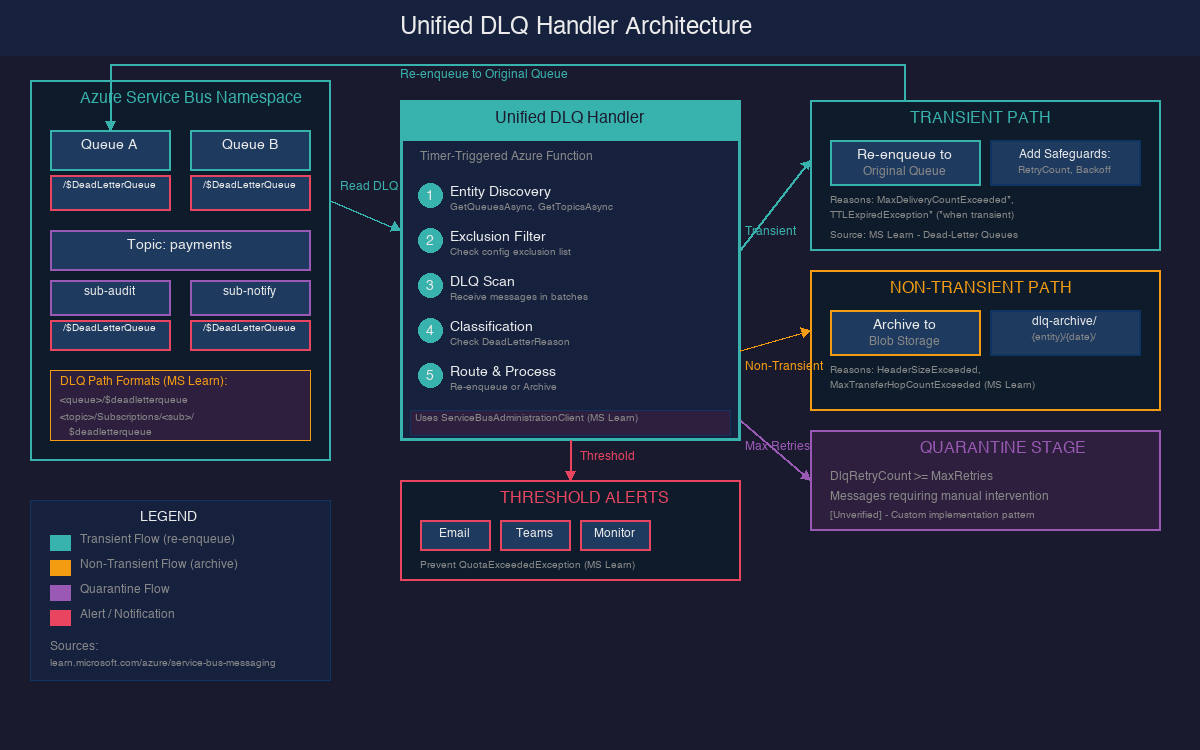
| Step | Action | Purpose |
|---|---|---|
| 1 | Entity Discovery | Enumerate all queues, topics, subscriptions in the namespace |
| 2 | Exclusion Filtering | Skip entities defined in the exclusion list |
| 3 | DLQ Scanning | Connect to each entity's DLQ and receive messages in batches |
| 4 | Classification | Analyze DeadLetterReason and ErrorDescription |
| 5 | Transient Handling | Re-enqueue with retry counter and exponential backoff |
| 6 | Non-Transient Handling | Archive to Azure Blob Storage as JSON |
| 7 | Threshold Monitoring | Trigger notifications when DLQ counts exceed limits |
| 8 | Cleanup | Complete (remove) processed messages from DLQ |
The handler operates against the entire namespace rather than individual entities. When a new queue or subscription appears, the handler discovers it automatically during its next scheduled run, no configuration changes required.
Technology Choice: Timer-Triggered Azure Function
The recommended compute platform is an Azure Function with a Timer Trigger. A timer-triggered function runs on a CRON schedule and can dynamically scan all entities in a namespace.
| Option | Pros | Cons |
|---|---|---|
| Timer-Triggered Function | Serverless, automatic scaling, cost-efficient for periodic workloads | Cold start latency, execution time limits |
| Service Bus Trigger per DLQ | Native integration, immediate processing | Requires separate binding per DLQ—defeats centralization |
| .NET Worker Service | Continuous processing, full control, horizontal scaling | Requires container orchestration, always-on compute cost |
A Service Bus trigger-based function would need explicit bindings for every DLQ path in the namespace. As entities grow, maintaining these bindings becomes the same problem you're trying to solve.
Entity Discovery with ServiceBusAdministrationClient
The unified handler uses ServiceBusAdministrationClient to enumerate all entities in the namespace dynamically.
"The ServiceBusAdministrationClient is the client through which all Service Bus entities can be created, updated, fetched, and deleted."
Key Discovery Methods
| Method | Purpose | Source |
|---|---|---|
GetQueuesAsync() | Retrieves the set of queues present in the namespace | Microsoft Learn |
GetTopicsAsync() | Retrieves the set of topics present in the namespace | Microsoft Learn |
GetSubscriptionsAsync(topicName) | Retrieves the set of subscriptions present in the topic | Microsoft Learn |
Performance Warning
"The ServiceBusAdministrationClient operates against an entity management endpoint without performance guarantees. It is not recommended for use in performance-critical scenarios."
For a timer-triggered function that runs every few minutes, this is acceptable. Discovery runs during each scheduled execution, the handler iterates through returned entities, filters against the exclusion list, and processes each non-excluded DLQ.
Exclusion Configuration
Not every entity should participate in unified DLQ processing. Legacy systems, test queues, or entities with specialized handling requirements need explicit exclusion.
| Exclusion Type | Configuration |
|---|---|
| Entire Queues | List queue names to skip completely |
| Entire Topics | List topic names to skip (all subscriptions excluded) |
| Specific Subscriptions | Map topic names to subscription arrays |
Application-Level Dead-Lettering Best Practice
When applications explicitly dead-letter messages, follow this guidance:
"We recommend that you include the type of the exception in the DeadLetterReason and the stack trace of the exception in the DeadLetterDescription as it makes it easier to troubleshoot the cause of the problem resulting in messages being dead-lettered."
Key Takeaways
- Centralization eliminates duplication. A single service handles DLQ processing for your entire namespace. Teams stop reimplementing the same logic across applications.
- Automatic discovery enables scale. New queues and subscriptions appear automatically. No configuration changes required when entities grow.
- Timer triggers fit the polling model. Scheduled execution with dynamic entity discovery works better than per-DLQ bindings that require explicit configuration.
- Classification drives routing. Every message gets analyzed before action. Transient failures return to their origin; non-transient failures go to archive.
- No automatic DLQ cleanup. Messages remain in the DLQ until explicitly retrieved and completed. Unmanaged buildup risks QuotaExceededException.
Next Step
Understanding why messages land in the DLQ is only half the problem. The next article dives into classification strategies and how to distinguish transient failures worth retrying from non-transient failures that should archive. You'll learn the two-tier classification approach, safeguards that prevent infinite retry loops, and the quarantine stage for messages that exhaust all retries.
References
| Resource | URL |
|---|---|
| Service Bus Dead-Letter Queues | https://learn.microsoft.com/en-us/azure/service-bus-messaging/service-bus-dead-letter-queues |
| ServiceBusAdministrationClient Class | https://learn.microsoft.com/en-us/dotnet/api/azure.messaging.servicebus.administration.servicebusadministrationclient |
| Service Bus Messaging Exceptions | https://learn.microsoft.com/en-us/azure/service-bus-messaging/service-bus-messaging-exceptions |
| Dead-Letter Queue Code Sample | https://github.com/Azure/azure-sdk-for-net/tree/main/sdk/servicebus/Azure.Messaging.ServiceBus/samples/DeadLetterQueue |