
Claude Code is Anthropic's agentic coding tool that runs in your terminal, understands your entire codebase, and executes tasks autonomously. Unlike Claude.ai's chat interface, it reads files, runs commands, and manages git workflows through natural language.
Introduction
Traditional AI coding assistants operate as sophisticated autocomplete engines—you prompt, they respond, you copy-paste. Claude Code breaks this pattern entirely. Released by Anthropic in February 2025 and made generally available in May 2025, it represents a fundamental shift from conversational AI to agentic AI that takes action on your behalf.
For Solution Architects evaluating AI tooling, the distinction matters. Claude Code doesn't just suggest code; it navigates your filesystem, executes shell commands, creates branches, and commits changes. It treats your development environment as its workspace, not a conversation thread.
This article establishes the architectural foundation you need before diving into installation and configuration. You'll understand what makes Claude Code different, how its components interact, and where it fits in your development stack.
Defining Agentic Coding
Agentic coding describes AI that autonomously plans and executes multi-step tasks with minimal human intervention. Rather than responding to isolated prompts, an agentic system understands goals, formulates execution plans, and takes action.
| Characteristic | Traditional AI Assistant | Agentic AI (Claude Code) |
|---|---|---|
| Interaction Model | Request → Response → Copy/Paste | Goal → Plan → Execute → Verify |
| Context Scope | Current prompt + limited history | Entire codebase + environment |
| Action Capability | Generates text output only | Reads/writes files, runs commands |
| Workflow | Human orchestrates each step | AI orchestrates, human approves |
| State Management | Stateless between prompts | Maintains session context |
Claude Code operates in your terminal, inheriting your bash environment, environment variables, and tool configurations. When you ask it to refactor a module, it reads the relevant files, understands dependencies, makes changes, runs tests, and reports results—all within a single conversation.
Core Architecture
Claude Code's architecture consists of four primary layers that work together to enable autonomous development tasks.
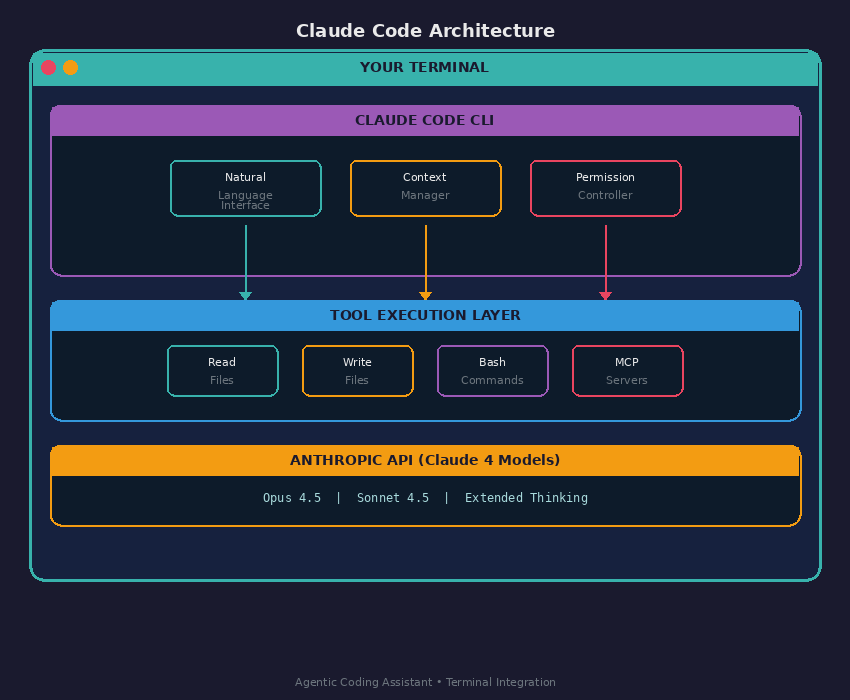
Natural Language Interface parses your requests and translates them into executable plans. You write plain English; Claude Code determines which tools to invoke.
Context Manager tracks your codebase structure, open files, conversation history, and project configuration via CLAUDE.md files. This layer ensures Claude maintains awareness across long sessions.
Permission Controller gates every action. Claude Code shows you what it intends to do and waits for approval before writing files or running commands. You control the trust boundary.
Tool Execution Layer performs the actual work—reading source files, writing changes, executing shell commands, and connecting to external services via MCP servers.
Claude Code vs. Claude.ai
Understanding the boundary between Claude Code and Claude.ai helps you choose the right tool for each task.
| Capability | Claude.ai (Web/App) | Claude Code (Terminal) |
|---|---|---|
| Primary Interface | Browser / Desktop App | Terminal / IDE |
| File System Access | Upload only | Full read/write |
| Command Execution | None | Full bash access |
| Git Operations | None | Branch, commit, push, PR |
| MCP Integration | Limited | Full server/client support |
| Subagents | Not available | Spawn specialized agents |
| Extended Thinking | Available | Available |
| Best For | Research, writing, analysis | Development, automation, refactoring |
Claude.ai excels at research, document analysis, and conversational tasks. Claude Code excels at hands-on development work where the AI needs to interact directly with your codebase and toolchain.
Key Capabilities
Claude Code provides five core capabilities that differentiate it from chat-based assistants:
1. Codebase Understanding
Point Claude Code at any project and ask questions. It reads files, follows imports, and builds a mental model of your architecture. No manual context stuffing required.
2. Autonomous Task Execution
Describe what you want accomplished, not how to do it. Claude Code formulates a plan, executes each step, and handles errors along the way.
3. Subagent Delegation
Complex tasks spawn specialized subagents. A code review request might create separate agents for security analysis, performance review, and style checking—each with focused context.
4. MCP Server Integration
Connect Claude Code to external services—databases, APIs, deployment pipelines—through the Model Context Protocol. Your AI assistant gains access to your entire toolchain.
5. Hybrid Reasoning Modes
Switch between fast responses and Extended Thinking for deep analysis. Complex architectural decisions benefit from deliberate reasoning; quick fixes use standard mode.
Execution Model
Every Claude Code interaction follows a predictable flow that balances autonomy with human oversight.
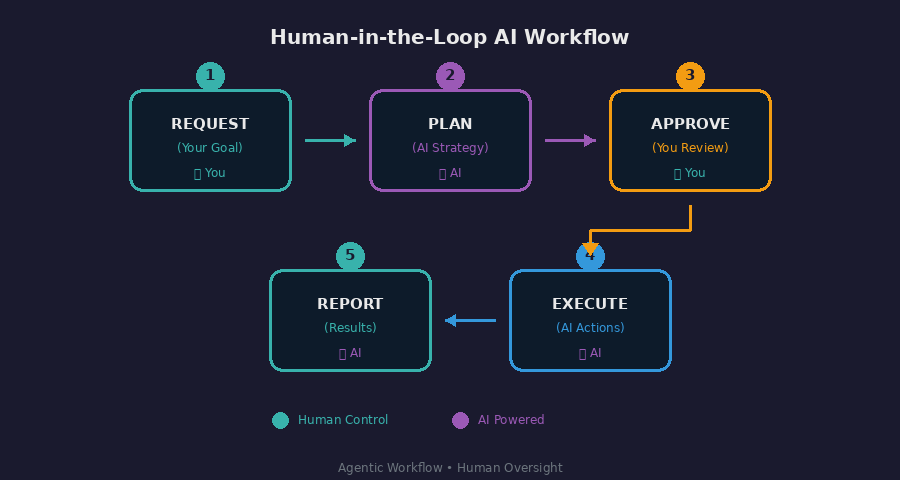
- Request — You describe your goal in natural language
- Plan — Claude Code analyzes the codebase and proposes a strategy
- Approve — You review the plan and grant permission
- Execute — Claude Code performs the work, tool by tool
- Report — You receive a summary of changes and outcomes
This loop repeats until the task completes. You remain in control at each approval checkpoint.
When to Use Claude Code
Claude Code fits specific architectural contexts. Use this decision framework:
| Scenario | Recommended Tool | Rationale |
|---|---|---|
| Exploring a new codebase | Claude Code | Reads files directly, follows dependencies |
| Writing a design document | Claude.ai | No file system access needed |
| Refactoring a module | Claude Code | Needs to modify multiple files |
| Reviewing a PR | Claude Code | Requires git access, file reading |
| Brainstorming architecture | Claude.ai | Conversational exploration |
| Automating CI/CD tasks | Claude Code | Executes commands, manages workflows |
| Generating test suites | Claude Code | Writes files, runs tests |
For Solution Architects, Claude Code becomes most valuable when tasks require direct interaction with code, infrastructure, or development tooling.
Key Takeaways
- Agentic, not conversational. Claude Code executes multi-step tasks autonomously rather than just answering questions. It operates as a collaborator with access to your development environment.
- Four-layer architecture. Natural language parsing, context management, permission control, and tool execution work together to enable safe autonomous operation.
- Permission-gated safety. Every file write and command execution requires your approval. You define the trust boundary through explicit permissions.
- MCP extends capabilities. The Model Context Protocol connects Claude Code to external services, transforming it from a coding assistant into an orchestration layer for your entire toolchain.
- Choose the right tool. Use Claude.ai for research and writing; use Claude Code when tasks require file system access, command execution, or git operations.